How to Calculate Days Between Two Dates: The Complete Guide
Learn how to calculate the number of days between two dates by hand, with a calculator, in Excel and in code, plus inclusive counting, leap years, weeks and business days.

Updated 16 min read
In this guide
- The short answer
- Why counting days by hand goes wrong
- Method 1: Use a days between dates calculator
- Method 2: Count month by month
- Method 3: The day of year shortcut
- Method 4: Count across years
- Inclusive or exclusive: should you count the first day?
- Leap years and February 29
- Converting days into weeks, months and years
- Counting forward and backward from a date
- Business days vs calendar days
- Days between dates in Excel and Google Sheets
- Days between dates in code
- Worked examples
- Common mistakes and how to avoid them
- Where day counts matter
- Day counts, time zones and daylight saving
- Date formats around the world
- A checklist for deadlines that matter
- Quick reference: days from January 1
- How astronomers and historians count days
- Practice examples with answers
- Days, nights and "per day" pricing
- Choosing the right method
- Frequently asked questions
- Count any two dates in seconds
Counting the days between two dates sounds simple until you try it. Months have different lengths, February changes every four years, and people disagree about whether the first and last day should count. A deadline that is off by one day can cost a refund, a late fee or a missed flight.
This guide shows every reliable way to calculate the number of days between two dates: the quick answer with our days between dates calculator, the month by month method you can do on paper, the day of year shortcut, and the formulas you need in Excel, Google Sheets and code. Along the way we cover inclusive counting, leap years, weeks, months and business days, so you can trust the number you get.
The short answer
To find the number of days between two dates, subtract the earlier date from the later one. The result is the count of calendar days from the start date to the end date, not counting the start date itself.
For example, from March 15, 2026 to July 4, 2026 there are 111 days. If you want to count both March 15 and July 4 as full days, add one and the answer becomes 112 days.
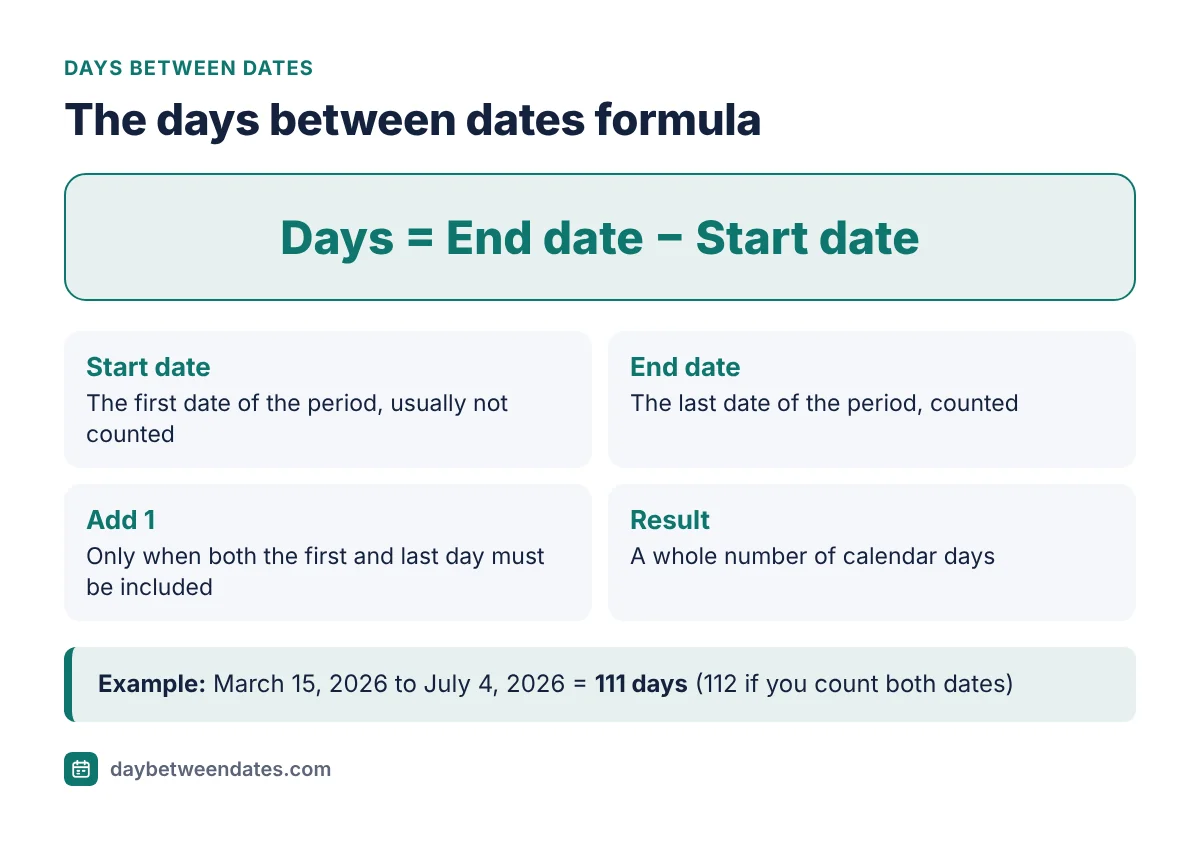
That one subtraction is the heart of every method. The rest of this guide is about doing that subtraction correctly when months, years and leap days get in the way.
Why counting days by hand goes wrong
If every month had 30 days, date math would be easy. It does not work that way. The Gregorian calendar we use has months of 28, 29, 30 and 31 days, and the pattern is not regular. On top of that:
- Leap years add February 29 roughly every four years, so the same two calendar dates can be 365 or 366 days apart depending on the year.
- Inclusive and exclusive counting give answers one day apart, and both are correct in different situations.
- Date formats differ by country. In the United States 03/04/2026 is March 4. In the UK, Europe and most of the world it is 3 April.
- Calendar days and business days are different counts. Ten calendar days can contain only six working days.
Each of these traps is easy to avoid once you know it is there. Let us start with the cleanest method.
Method 1: Use a days between dates calculator
The fastest and safest way is a calculator. Enter the start date and the end date and you get the total days, plus the same period in weeks, months and years. Our days between dates calculator also lets you include the end date, count only weekdays and see the result broken down so you can check it.
A calculator is the right choice when:
- the dates are far apart, such as several years
- the period crosses one or more February 29 dates
- you need business days, not calendar days
- the number matters for money, law or travel
Use the manual methods below when you want to understand the answer, double check a result or work without a device.
Method 2: Count month by month
This is the method most people learned at school, and it works for any two dates. You split the period into three parts: what is left of the first month, the full months in the middle, and the days used in the last month.
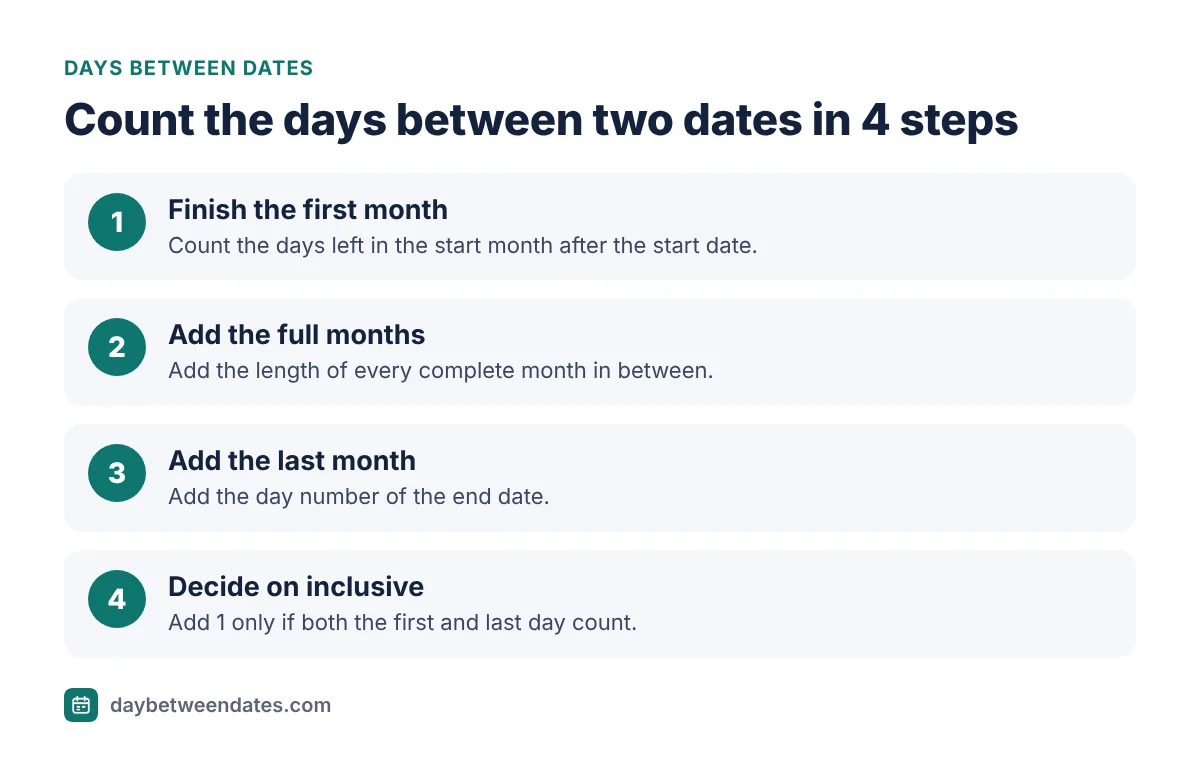
Let us count the days from March 15, 2026 to July 4, 2026.
- Days left in March after the 15th: March has 31 days, so 31 − 15 = 16 days.
- Full months in between: April (30) + May (31) + June (30) = 91 days.
- Days in the last month: July 4 adds 4 days.
- Total: 16 + 91 + 4 = 111 days.
Notice that step 1 subtracts the start day, which is why the start date itself is not counted. If you need an inclusive count, add one at the end.
The only facts you need are the lengths of the months, so keep this table handy.
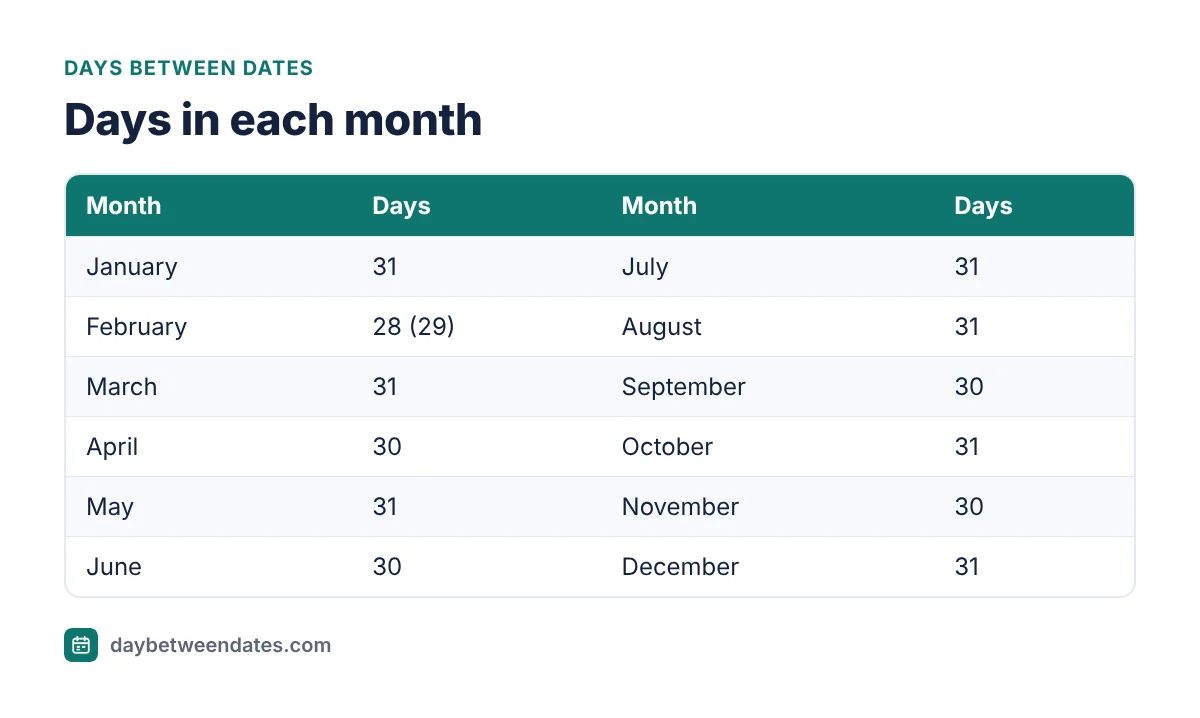
We explain the memory tricks, including the knuckle rule and the old rhyme, in how many days are in each month. For a slower walk through more examples, see how to count days between two dates by hand.
Method 3: The day of year shortcut
Every date has a day of year number, also called an ordinal date. January 1 is day 1, February 1 is day 32 and December 31 is day 365 (or 366 in a leap year). When both dates fall in the same year, you can subtract their day numbers directly.
| Date | Day of year (2026) |
|---|---|
| February 10 | 41 |
| March 15 | 74 |
| July 4 | 185 |
| November 26 | 330 |
From March 15 to July 4: 185 − 74 = 111 days, the same answer as before. From February 10 to November 26: 330 − 41 = 289 days.
To use this shortcut you need the day number of the first day of each month. In a normal year those are:
| Month starts | Day number | Month starts | Day number |
|---|---|---|---|
| Jan 1 | 1 | Jul 1 | 182 |
| Feb 1 | 32 | Aug 1 | 213 |
| Mar 1 | 60 | Sep 1 | 244 |
| Apr 1 | 91 | Oct 1 | 274 |
| May 1 | 121 | Nov 1 | 305 |
| Jun 1 | 152 | Dec 1 | 335 |
Find the day number of any date by taking the month start number, adding the day of the month and subtracting one. March 15 is 60 + 15 − 1 = 74. In a leap year, add one to every month from March onward.
When the two dates fall in different years, count the days left in the first year, add 365 or 366 for each full year in between, then add the day number of the end date.
Method 4: Count across years
Long periods are where hand counting breaks down, so it helps to work in whole years first.
Take August 20, 2024 to February 5, 2026.
- From August 20, 2024 to August 20, 2025 is one full year. Because that stretch does not contain a February 29 (the leap day in 2024 came before August), it is 365 days.
- From August 20, 2025 to February 5, 2026 is 11 days left in August, then September 30, October 31, November 30, December 31, January 31 and 5 days of February: 11 + 30 + 31 + 30 + 31 + 31 + 5 = 169 days.
- Total: 365 + 169 = 534 days.
The key question for each full year is whether it contains a February 29. A year counted from a date after February 29 of a leap year is 365 days. A year counted across a February 29 is 366 days. Our article on leap years and day counts has a simple table for this.
Inclusive or exclusive: should you count the first day?
This is the question behind most "my count is one day off" problems. The standard way to count, used by calculators, spreadsheets and programming languages, is exclusive of the start date: it measures the gap between two dates. Monday to Friday is 4 days, the same way 1 to 5 on a ruler is 4 units.
Some situations count every calendar day touched, which means including both the first and the last date:
- hotel stays and trips described as "days" rather than nights
- leave requests and vacation days
- event and conference days
- many school attendance and medication schedules
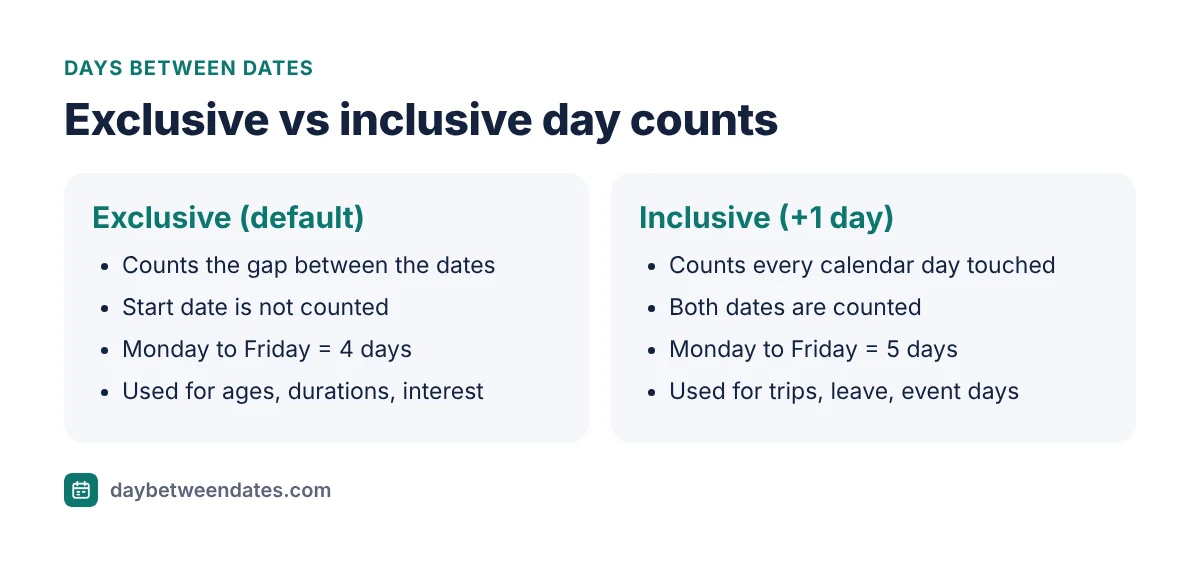
The fix is easy: calculate the normal difference and add 1 for an inclusive count. Read inclusive vs exclusive days for real examples and the rules used in contracts and legal deadlines.
Leap years and February 29
A leap year has 366 days instead of 365, because February gets a 29th day. The rule for the Gregorian calendar is:
- a year divisible by 4 is a leap year,
- except a year divisible by 100, which is not,
- except a year divisible by 400, which is.
So 2024 and 2028 are leap years, 2026 and 2027 are not, 1900 was not, and 2000 was. A leap day only changes your count if February 29 falls inside your period. From January 1 to March 1 is 59 days in 2026 but 60 days in 2028.
Calculators and spreadsheet date functions handle this for you, which is one more reason to use them for long periods.
Converting days into weeks, months and years
A raw count of days is precise, but people often want it in bigger units.
Weeks: divide by 7. The 111 days from March 15 to July 4 are 15 weeks and 6 days (15 × 7 = 105, with 6 left over). More on this in how many weeks are between two dates.
Years, months and days: this is not a simple division, because months have different lengths. The correct method counts whole years first, then whole months, then the remaining days. March 15 to July 4, 2026 is 3 months and 19 days. A birth date of May 14, 1990 to November 3, 2026 is 36 years, 5 months and 20 days. We show the full method in years, months and days between two dates.
Average lengths: when you only need an estimate, use 30.44 days per month and 365.25 days per year. Never use these averages for a deadline or a legal count.
| Unit | Exact or average | Days |
|---|---|---|
| Week | Exact | 7 |
| Month | Average | 30.44 |
| Quarter | Average | 91.31 |
| Year | Normal year | 365 |
| Year | Leap year | 366 |
| Year | Average | 365.25 |
Counting forward and backward from a date
The same math works in reverse. Instead of two dates, you have one date and a number of days, and you want the other date.
- Adding days: 90 days after January 15, 2027 is April 15, 2027. Thirty days after January 15, 2027 is February 14.
- Subtracting days: 90 days before January 15, 2027 is October 17, 2026. 180 days before it is July 19, 2026.
This is how return windows, warranty periods, notice periods and medication courses are worked out. Count the remaining days in the current month first, then step through each following month until the days run out. Our guides on 30, 60 and 90 days from today and what was 90 days ago walk through both directions.
Business days vs calendar days
Calendar days count every day. Business days (also called working days) skip weekends and usually public holidays. In 2026 there are 365 calendar days but only 261 weekdays before holidays are removed. From March 16 to April 10, 2026 there are 25 calendar days but 20 business days.
Shipping estimates, bank transfers, legal response periods and many contracts use business days, so always check which kind of day a deadline means. If the wording says "days" with no other detail, many legal systems treat it as calendar days, but the rules differ by country and court, so read the specific rule.
A quick way to count business days for short periods:
- Count the full weeks and multiply by 5.
- Count the leftover weekdays by hand.
- Subtract any public holidays that fall on a weekday in the period.
Days between dates in Excel and Google Sheets
Spreadsheets store dates as serial numbers, so subtracting one date from another gives the number of days directly.
| What you want | Excel or Google Sheets formula |
|---|---|
| Days between two dates | =B2-A2 |
| Same, with a function | =DAYS(B2, A2) |
| Inclusive count | =B2-A2+1 |
| Days from a date to today | =TODAY()-A2 |
| Whole months between dates | =DATEDIF(A2, B2, "m") |
| Years, months and days | =DATEDIF(A2,B2,"y")&" y "&DATEDIF(A2,B2,"ym")&" m "&DATEDIF(A2,B2,"md")&" d" |
| Business days (Mon to Fri) | =NETWORKDAYS(A2, B2) |
| Business days minus holidays | =NETWORKDAYS(A2, B2, H2:H12) |
Two tips save a lot of confusion. First, format the result cell as a Number, not a Date, or Excel will show a strange date such as 20 April 1900. Second, NETWORKDAYS counts both the start and end date when they are weekdays, so it is inclusive while plain subtraction is not.
Days between dates in code
Every major programming language has date types that handle month lengths and leap years for you.
Python:
from datetime import date
print((date(2026, 7, 4) - date(2026, 3, 15)).days)  # 111
JavaScript:
const ms = new Date(2026, 6, 4) - new Date(2026, 2, 15);
console.log(Math.round(ms / 86400000)); // 111
In JavaScript, months start at 0, so 6 means July and 2 means March. Rounding protects you from daylight saving time changes, which make some days 23 or 25 hours long.
SQL: MySQL uses DATEDIFF('2026-07-04', '2026-03-15'), while SQL Server uses DATEDIFF(day, '2026-03-15', '2026-07-04'). Both return 111.
Worked examples
Here are common periods people look up, all counted exclusively (add one for inclusive counts).
| From | To | Days |
|---|---|---|
| Jan 1, 2026 | Jan 1, 2027 | 365 |
| Jan 1, 2026 | Mar 1, 2026 | 59 |
| Jan 1, 2028 | Mar 1, 2028 | 60 (leap year) |
| Jun 1, 2026 | Aug 31, 2026 | 91 |
| Sep 7, 2026 | Dec 25, 2026 | 109 |
| Dec 20, 2025 | Jan 10, 2026 | 21 |
| Mar 15, 2026 | Jul 4, 2026 | 111 |
| May 14, 1990 | May 14, 2026 | 13,149 |
The last row is a good reminder of how leap years add up. Thirty six years of 365 days would be 13,140 days, but nine February 29 dates fall in that span, giving 13,149.
Common mistakes and how to avoid them
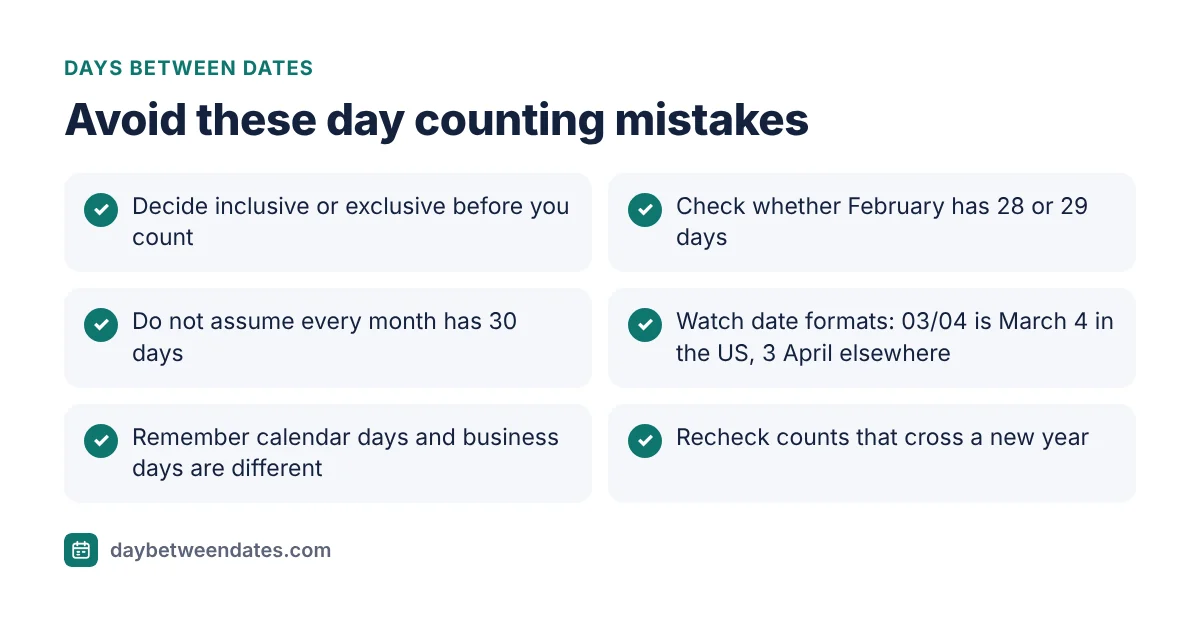
Most counting errors come from a handful of habits:
- Assuming 30 day months. Seven months have 31 days. Over a few months, that error adds up to several days.
- Forgetting the leap day. Any period that contains February 29 is one day longer than the same dates in a normal year.
- Mixing inclusive and exclusive. Decide before you count, and write it down if the number goes into a contract or schedule.
- Reading the date in the wrong format. If a date like 04/05 could be read two ways, confirm it before counting.
- Counting from the wrong anchor. "Within 30 days of delivery" starts on the delivery date, not the order date.
- Ignoring time zones. A deadline at midnight in New York is already the next day in London.
Where day counts matter
Day counting is not just trivia. It shows up in decisions that affect money, health and plans:
- Returns and warranties: most retailers give 14, 30 or 90 days from purchase or delivery.
- Rent and notice periods: a 30 or 60 day notice has to be counted to the right date.
- Interest and loans: banks count the exact days between payments, and some use 360 day years.
- Pregnancy and health: due dates, medication courses and quarantine periods are counted in days.
- Travel and visas: stay limits such as 90 days in any 180 day period depend on exact counts.
- Projects and events: countdowns, sprints and launch plans need reliable day totals.
When the stakes are high, count twice: once with a calculator and once by hand or in a spreadsheet. If both agree, you can rely on the number.
Day counts, time zones and daylight saving
Dates feel universal, but a date only exists in a time zone. At 8 pm on March 31 in Los Angeles it is already April 1 in London and Karachi. If a deadline says "by March 31" and the other party is in a different country, ask which time zone applies, or you may lose a day without noticing.
Daylight saving time causes a different problem. On the night the clocks change, a day is 23 or 25 hours long. If you count days by dividing hours by 24, as some spreadsheets and programs do when they work with date and time values, you can end up with 110.96 days instead of 111. The fix is simple:
- count dates, not timestamps, whenever you only care about days
- if you must use timestamps, round the result to the nearest whole day
- in code, use date only types such as Python's
dateinstead ofdatetime
Date formats around the world
A day count is only as good as the dates you enter. The same digits mean different dates in different countries.
| Written date | United States | UK, Europe, most of the world | ISO 8601 |
|---|---|---|---|
| 03/04/2026 | March 4, 2026 | 3 April 2026 | 2026-03-04 or 2026-04-03 |
| 12/01/2027 | December 1, 2027 | 12 January 2027 | 2027-12-01 or 2027-01-12 |
| 07/08/2026 | July 8, 2026 | 7 August 2026 | 2026-07-08 or 2026-08-07 |
The international standard, ISO 8601, writes dates as year, month and day (2026-03-04). It is unambiguous and sorts correctly, which is why databases and programmers use it. When you share dates in contracts or emails across borders, writing the month as a word (4 March 2026 or March 4, 2026) removes all doubt.
A checklist for deadlines that matter
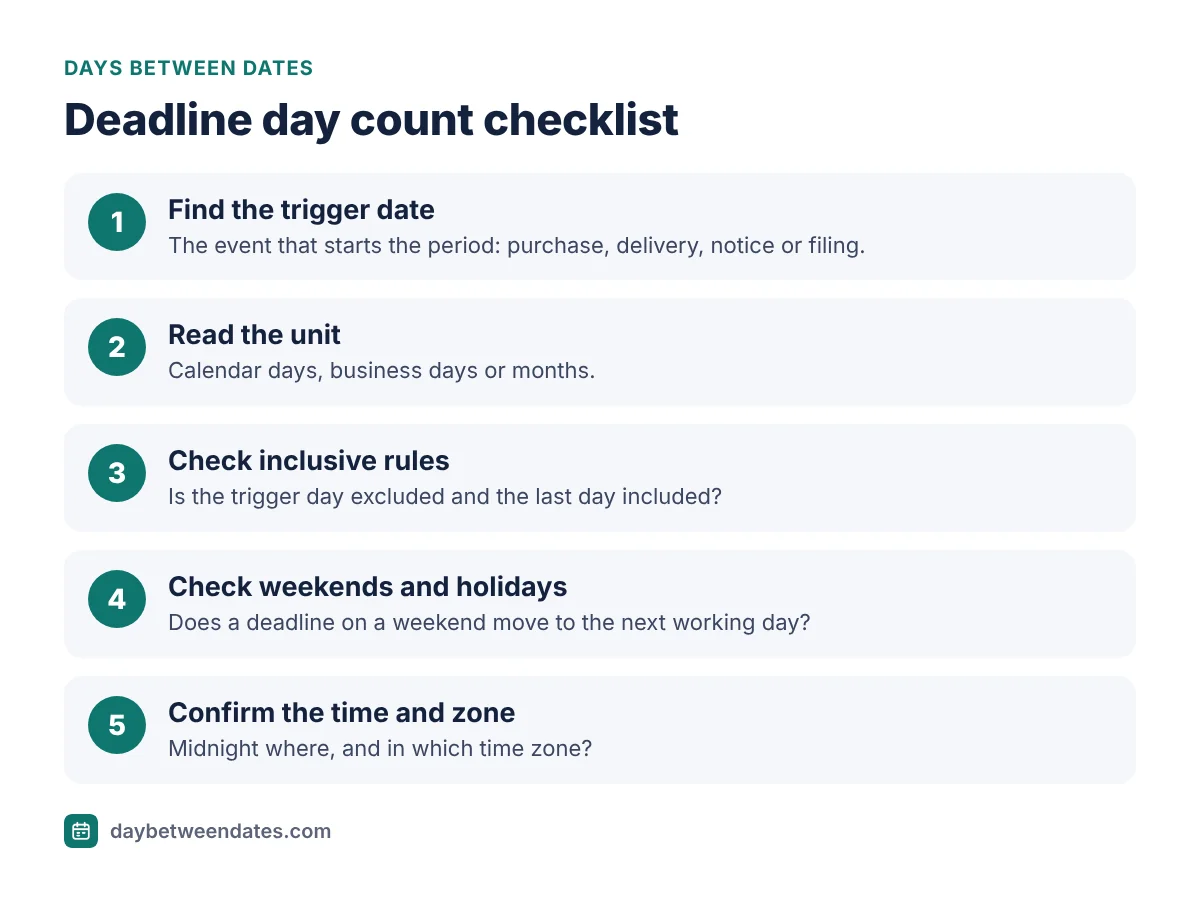
For a return window or a library book, a rough count is fine. For a tax filing, a lease notice, a court deadline or a visa stay, slow down and check each of these points:
- What starts the clock? "30 days from the invoice date" and "30 days from receipt" are different deadlines.
- Which kind of day? Calendar days, business days and banking days give very different results.
- Is the first day counted? Most rules exclude the trigger day and include the last day.
- What happens on weekends and holidays? Many rules move a deadline that falls on a weekend or public holiday to the next working day. Others do not.
- What time, and where? "By the end of the day" can mean 5 pm local time, midnight, or the closing time of a specific office.
Write the final date down with the reasoning next to it. If anyone questions the date later, you can show exactly how it was counted.
Quick reference: days from January 1
The table below shows how many days have passed from January 1 to the first day of each month. It is handy for quick mental math and for checking spreadsheet results. Add one day from March onward in a leap year.
| From January 1 to | Days (normal year) | Days (leap year) |
|---|---|---|
| February 1 | 31 | 31 |
| March 1 | 59 | 60 |
| April 1 | 90 | 91 |
| May 1 | 120 | 121 |
| June 1 | 151 | 152 |
| July 1 | 181 | 182 |
| August 1 | 212 | 213 |
| September 1 | 243 | 244 |
| October 1 | 273 | 274 |
| November 1 | 304 | 305 |
| December 1 | 334 | 335 |
| Next January 1 | 365 | 366 |
To count between two dates in the same year, look up both month starts, add the day of the month to each and subtract. For example, from April 10 to September 25 in a normal year: (243 + 25) − (90 + 10) = 268 − 100 = 168 days.
How astronomers and historians count days
Long before spreadsheets, astronomers needed a way to count days without worrying about months, years or calendar reforms. In 1583 the scholar Joseph Scaliger proposed a continuous count, later developed into the Julian Day Number. It numbers every day in a single sequence starting from January 1, 4713 BC. Noon on January 1, 2000 is Julian Date 2,451,545. Finding the days between two events is then a simple subtraction, which is exactly how modern computer systems treat dates internally.
History also explains some strange gaps. When Britain and its colonies switched from the Julian to the Gregorian calendar in 1752, September 2 was followed directly by September 14. Eleven dates simply never happened that year. Most date calculators use the Gregorian calendar for all years, so counts that reach back before the switch in a particular country may not match the calendar people used at the time. For modern dates this never matters, but genealogists and historians need to keep it in mind.
Practice examples with answers
Try these before you check the answers. They cover the traps that catch most people: month ends, new years and leap years. All answers are exclusive counts.
| Question | Answer |
|---|---|
| February 14 to October 31, 2026 | 259 days |
| December 25, 2026 to July 4, 2027 | 191 days |
| January 1 to December 31, 2027 | 364 days |
| February 1 to March 15, 2028 (leap year) | 43 days |
| November 26, 2026 to November 25, 2027 | 364 days |
Two of these deserve a closer look. January 1 to December 31 is 364 days, not 365, because the count excludes January 1. If you want every day of the year, count inclusively and you get 365. February 1 to March 15, 2028 is 43 days because February 2028 has 29 days. In 2027 the same dates would give 42.
If your answers match, you have the method nailed. If not, the most likely cause is a month length or a leap day, so recheck those first.
Days, nights and "per day" pricing
One more source of confusion is the difference between days and nights. A hotel booking from June 10 to June 14 is 4 nights, which matches the exclusive day count. A car rental over the same dates may be priced as 4 days or 5 days, depending on pick up and return times, because many rental companies charge per 24 hour period. Tour operators often advertise "5 days, 4 nights" for the same trip. When a price is quoted per day, check how the company counts the first and last day before you compare offers.
Choosing the right method
Each counting method has a place:
| Situation | Best method |
|---|---|
| Quick everyday count | Calculator |
| Checking a calculator or contract | Month by month by hand |
| Two dates in the same year | Day of year numbers |
| Many dates in a list | Spreadsheet formula |
| Apps, reports and automation | Date functions in code |
| Working days and deadlines | Business day calculator or NETWORKDAYS |
Whatever method you use, the logic never changes: find the gap between two points on the calendar, then decide whether the first day counts.
Frequently asked questions
How do I calculate the number of days between two dates?
Subtract the earlier date from the later date. By hand, count the days left in the first month, add the full months in between and add the days of the last month. A calculator or a spreadsheet formula such as =B2-A2 does this instantly.
Does the count include the start date?
The standard count does not include the start date. It measures the gap between the dates. If you need to include both the start and end date, add one day to the result.
How many days are between two dates one year apart?
365 days, or 366 if the period includes February 29. For example, January 1, 2026 to January 1, 2027 is 365 days, while January 1, 2028 to January 1, 2029 is 366 days.
How do I count only weekdays between two dates?
Count full weeks and multiply by 5, then add the leftover weekdays and subtract public holidays. In Excel or Google Sheets, use =NETWORKDAYS(start, end).
Why is my calculator one day different from my own count?
Almost always because one count is inclusive and the other is not. Check whether you counted both the first and last day. The second most common cause is a missed leap day.
Count any two dates in seconds
You now know how to count days by month, by day of year, across years and in spreadsheets or code, and how to handle leap years, inclusive counts and business days. For everyday use, the quickest and most accurate route is still a calculator: enter two dates and get the days, weeks, months and working days at once. Try the free days between dates calculator now and check your next deadline in seconds.
More guides in this series
- Should You Count the Start and End Date? Inclusive vs Exclusive Days
- How to Count Days Between Two Dates by Hand
- How Many Days Are in Each Month? Table and Memory Tricks
- Leap Years: How They Change Day Counts
- How to Find Years, Months and Days Between Two Dates
- How Many Weeks Between Two Dates?
- What Date Is 30, 60 or 90 Days From Today?
- What Was 90 Days Ago? Counting Days Backward
Sources
Free calculator
Run your own numbers now
Count the days between any two dates in seconds with the free calculator. No sign up, and nothing leaves your browser.


