How to Find Years, Months and Days Between Two Dates
How to express the time between two dates in years, months and days, with the correct counting method, worked examples, month end rules and Excel DATEDIF formulas.

Updated 3 min read

In this guide
Sometimes a raw number of days is not the answer people want. "534 days" is precise, but "1 year, 5 months and 16 days" is easier to understand. Ages, job tenure, loan terms and project lengths are usually given this way. The tricky part is that months have different lengths, so you cannot simply divide.
This guide explains the correct method, shows worked examples and gives the Excel formula. For counting plain days, see the main guide to days between two dates.
Why you cannot just divide
If you divide 534 days by 30, you get 17.8 months. If you divide by 30.44, the average month, you get 17.54. Neither tells you how many calendar months passed, because the answer depends on which months are involved. February is 28 days, July is 31. The only reliable approach is to step through the calendar.
The method
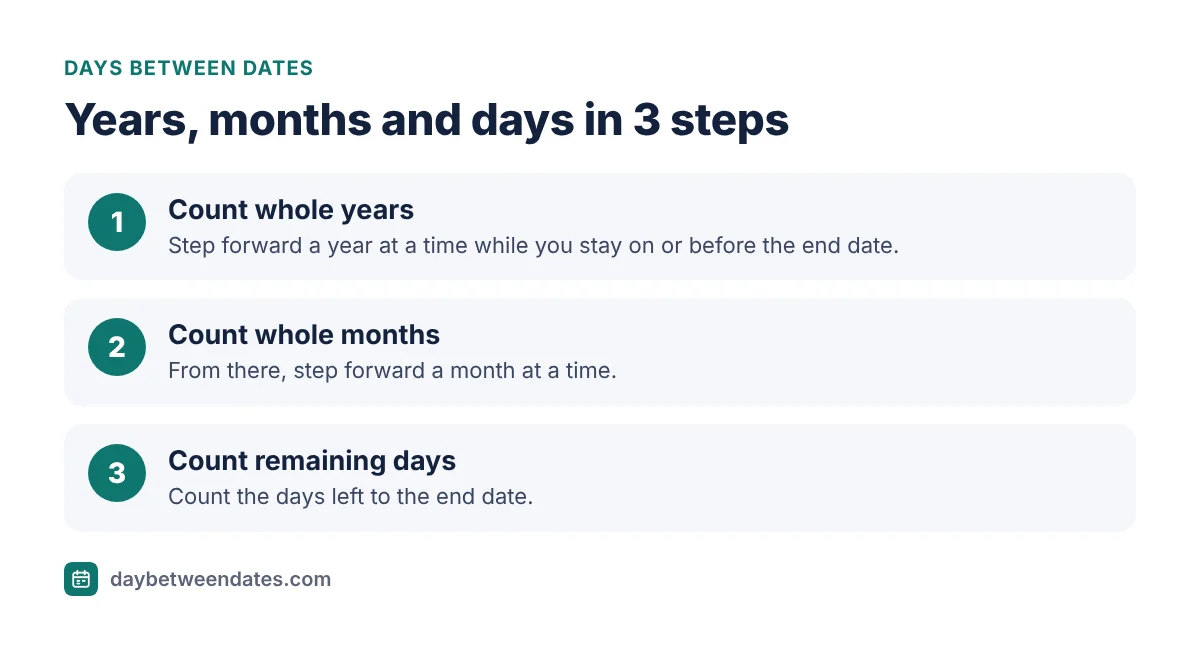
Example: August 20, 2024 to February 5, 2026.
- Whole years: August 20, 2024 → August 20, 2025 is 1 year. Another year would reach August 20, 2026, which is past the end date. So 1 year.
- Whole months: from August 20, 2025, step forward a month at a time: September 20, October 20, November 20, December 20, January 20, 2026. That is 5 months. Another month would be February 20, past the end.
- Remaining days: January 20 to February 5, 2026 is 11 days left in January plus 5 days of February = 16 days.
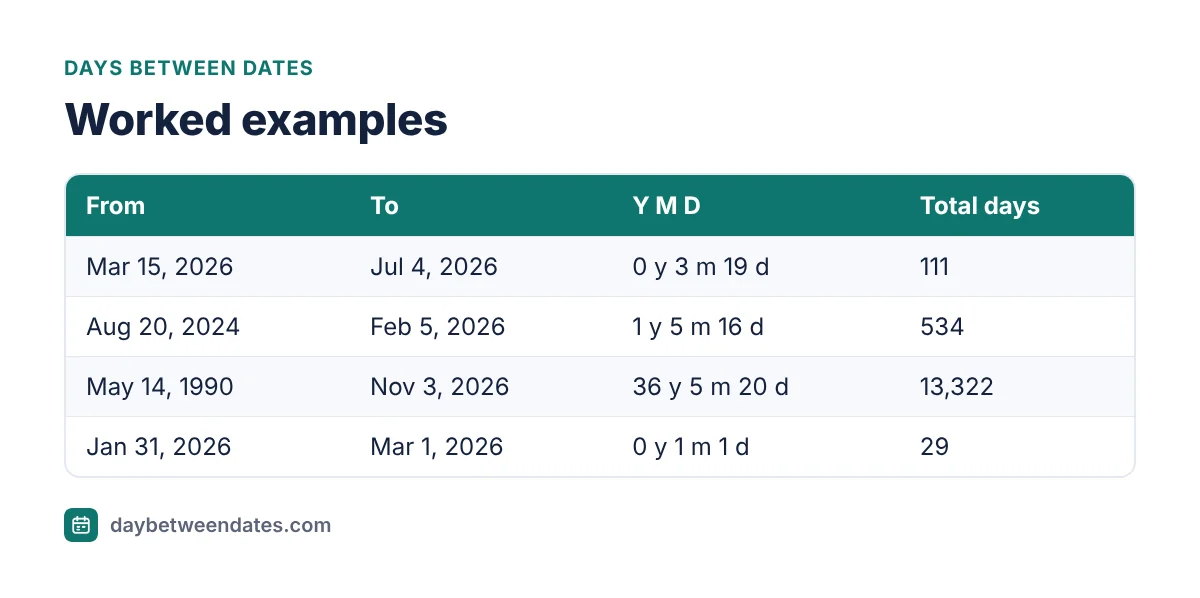
Result: 1 year, 5 months and 16 days.
The month end problem
What is one month after January 31? There is no February 31, so different systems handle it differently. Most calculators and Excel's DATEDIF treat January 31 to February 28 as 0 months and 28 days, and January 31 to March 1 as 1 month and 1 day in a normal year. Some people would call January 31 to February 28 "one month", because it runs to the end of February.
Neither is wrong, but it pays to be consistent. If a contract uses calendar months, it usually defines what happens when the day does not exist in the target month, often moving to the last day of that month.
In Excel and Google Sheets
The DATEDIF function returns each part separately:
| Part | Formula |
|---|---|
| Whole years | =DATEDIF(A2, B2, "y") |
| Months after the whole years | =DATEDIF(A2, B2, "ym") |
| Days after the whole months | =DATEDIF(A2, B2, "md") |
| Total whole months | =DATEDIF(A2, B2, "m") |
| Total days | =DATEDIF(A2, B2, "d") |
Combine them into one sentence:
=DATEDIF(A2,B2,"y")&" years, "&DATEDIF(A2,B2,"ym")&" months, "&DATEDIF(A2,B2,"md")&" days"Microsoft notes that the "md" option can give wrong results in some month end cases, so double check results when the start date is the 29th, 30th or 31st.
Calculating age
Age is the most common use. Someone born on May 14, 1990 is 36 years, 5 months and 20 days old on November 3, 2026, or 13,322 days. Most countries count a person as one year older on their birthday, which matches the whole years step above.
Converting to a single unit
When you need one number:
- Total months: years × 12 + months. One year and 5 months = 17 months.
- Total weeks: total days ÷ 7. 534 days = 76 weeks and 2 days. See weeks between two dates.
- Decimal years: total days ÷ 365.25. 534 days ≈ 1.46 years.
Get the breakdown automatically
Stepping through years and months by hand is reliable but slow. Our days between dates calculator shows the total days together with the years, months and days breakdown, so you get both the exact count and the human friendly version in one go.
More guides in this series
- How to Calculate Days Between Two Dates: The Complete Guide
- How Many Weeks Between Two Dates?
- What Date Is 30, 60 or 90 Days From Today?
- What Was 90 Days Ago? Counting Days Backward
Free calculator
Run your own numbers now
Count the days between any two dates in seconds with the free calculator. No sign up, and nothing leaves your browser.


